Bill Mill

(replying to Julia Evans)

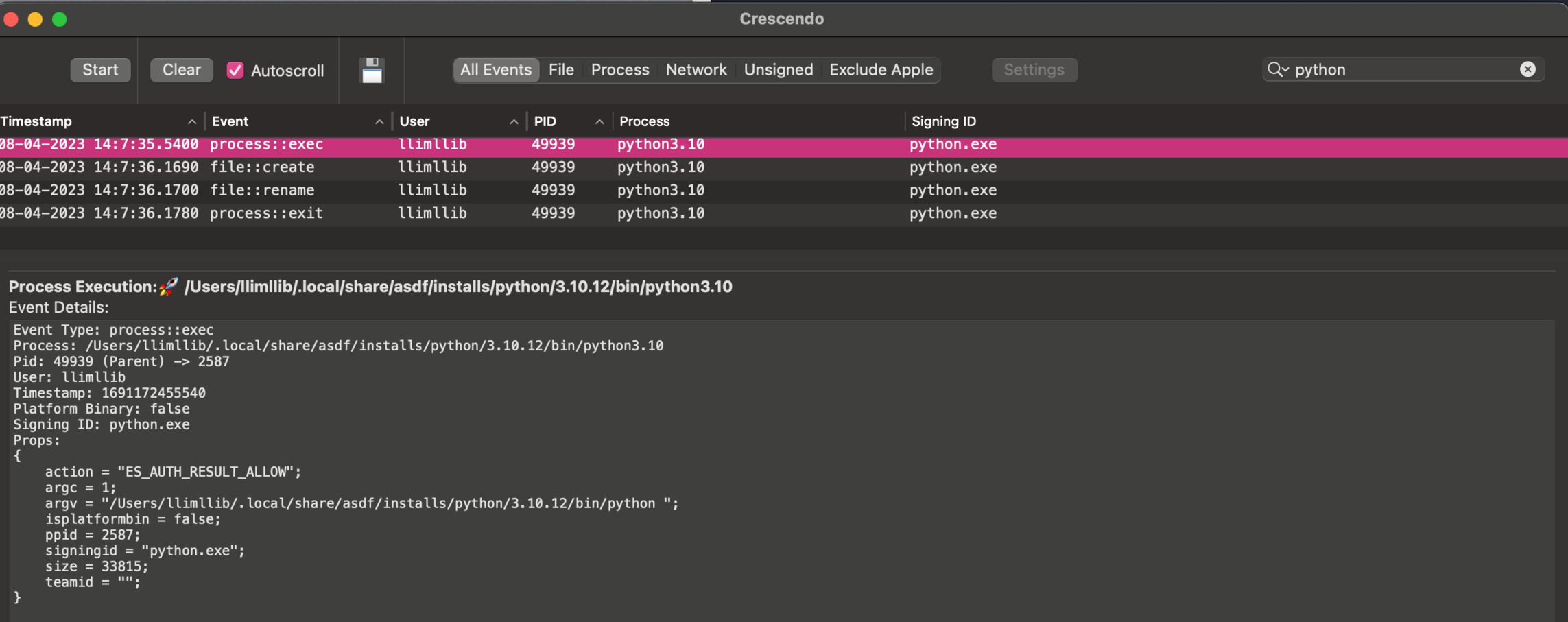
@b0rk The closest I know how to get on a mac without disabling SIP is to install an app that uses a kernel extension to monitor system events. Here's crescendo (github.com/SuprHackerSteve/Cre) for example:

1 replies →
1 replies

Saagar Jha

(replying to Bill Mill)
@llimllib @b0rk This uses Apple’s Endpoint Security framework, rather than a kernel extension. It runs entirely in userspace! If you want to just poke around there’s a built-in tool called “eslogger” on newer versions of macOS that dumps the raw events as JSON.
1 replies →
1 replies

Bill Mill

(replying to Saagar Jha)

@saagar @b0rk eslogger is fabulous! thank you for that.

Saagar Jha

(replying to Saagar Jha)
@llimllib @b0rk This is a list of the events it tracks and the data it collects for each: https://developer.apple.com/documentation/endpointsecurity/event_types

Bill Mill

(replying to Bill Mill)

@b0rk it will show you file creation and removal, but not stat unfortunately

Bill Mill

(replying to Bill Mill)

@b0rk oh I should have included that it gives you details on the events too, here's the python exec:
Bill Mill

(replying to Bill Mill)

@b0rk If you disable SIP, you can use dtrace or dtruss like strace I think, I'm just not willing to do that to test it out at the moment - if you're interested I can dig into it ab it

1 replies →
1 replies

Julia Evans

(replying to Bill Mill)

@llimllib yea i'm not willing to disable SIP either. whenever I ask about Mac spy tools like this I usually get answers like "oh yeah you can do X but I've never tried it” which makes me very suspicious about the actual utility of the Mac tools in practice :)

Saagar Jha

(replying to Julia Evans)
@b0rk @llimllib I assure you that they are very helpful, but they are also somewhat difficult to wield :)

Bill Mill

(replying to Bill Mill)

@b0rk process monitor and file monitor appear to do the same thing with the same os tools on the command line, but I haven't tried them out: objective-see.org/products/uti