
Julia Evans
(replying to Julia Evans)
I'd love suggestions for additions to this one, ESPECIALLY if they include a way to showcase another cool Linux spy tool
2 replies

Zack Weinberg
(replying to Julia Evans)
@b0rk I know the answers to a bunch of the things you said you weren't sure of, if that would help?
Zack Weinberg
(replying to Julia Evans)
@b0rk OK, here goes:
The best explanation I can find for the extra three octal digits in the "mode" field of an inode is here: https://man7.org/linux/man-pages/man7/inode.7.html (scroll down to "The file type and mode").
Basically, the mode packs two unrelated pieces of information into a single field: the top two octal digits indicate what kind of file it is ("regular" file, directory, symbolic link, etc -- there's a list on that page), and the bottom four are the permissions.
It's four, not three, octal digits for the permissions because the highest three permission bits (4000, 2000, 1000) are special and very rarely used. There's an explanation of these on that manpage as well, look for "set-user-id", "set-group-id", and "sticky". An example of a program that uses bit 4000 is /usr/bin/sudo.
1 replies
Julia Evans
(replying to Zack Weinberg)
@zwol this is great -- I never know about these man pages like `man inode`. Added it to the blog post
Zack Weinberg
(replying to Julia Evans)
@b0rk I didn't know about that one myself, I found it by starting with `man 2 stat`, which referred me to `man 3type stat`, and _that_ one referred me to `man inode`.
Zack Weinberg
(replying to Zack Weinberg)
@b0rk I regret to say I don't know how to do any of this inspection on a Mac either. It was a regular frustration point for me when I was doing software development on a Mac about eight years ago.

systemd-jaded.timer
(replying to Zack Weinberg)
@zwol @b0rk to my knowledge:
ldd => otool -L
strace => dtruss (may not work with system integrity protection)
readelf, objdump => otool (though you can install binutils to get objdump)
1 replies
systemd-jaded.timer
(replying to systemd-jaded.timer)
@zwol @b0rk also i just ran into this post which explains so much about macOS's loader and such https://developer.apple.com/forums/thread/715385
Zack Weinberg
(replying to Zack Weinberg)
@b0rk The contents of the symbolic link -- the name of the file that the link points to -- are packed inside the inode itself, and you actually saw them in your hexdump, you called out "you can see [this] says 'python3' in it". Look carefully at the end of that line of the hexdump and the beginning of the next line and you'll see that the string embedded in the inode is in fact "python3.9".
(You're probably now wondering where the name _of_ the symbolic link is. That name isn't stored in the inode at all! It's only stored in the _directory entry_. If you use debugfs to inspect the contents of the directory /usr/bin you should be able to find the string "python3" paired with a reference to inode 6206.)
(Depending on the filesystem, very long symbolic links may get stored in content blocks rather than in the inode. I don't know how that works with the filesystem you're using.)
Zack Weinberg
(replying to Zack Weinberg)
@b0rk You don't see a bunch of `stat` system calls to work out the paths of the shared libraries because that information is precalculated and stored in `/etc/ld.so.cache`, which it opens on line 4 of your full strace report. I am not sure if this is documented anywhere. I only know about it myself because I help out with glibc development sometimes.
And finally, I don't know _exactly_ what the system calls on lines 71 through 83 of the full strace are for, but I know some of it:
- `arch_prctl(ARCH_SET_FS, ...)` is setting the x86 register %fs, which can be used to hold a pointer (Linux uses it to point to data that varies from thread to thread, like `errno`) but for complicated historical reasons only the kernel can _set_ that pointer.
- The long string of `mprotect`s are making parts of the shared libraries read-only. These parts have to be writable while the dynamic linker is working, but after it's done setting everything up they can be read-only. This is a security feature, but I only vaguely understand why (it has to do with making it harder to exploit buffer overflow bugs).
- The `munmap` on line 81 pairs with the `mmap` on line 6. The dynamic linker is done with `/etc/ld.so.cache` at this point.
- I don't know what `set_tid_address` and `set_robust_list` are for.
Saagar Jha
(replying to Zack Weinberg)
Saagar Jha
(replying to Saagar Jha)

Bill Mill
(replying to Julia Evans)
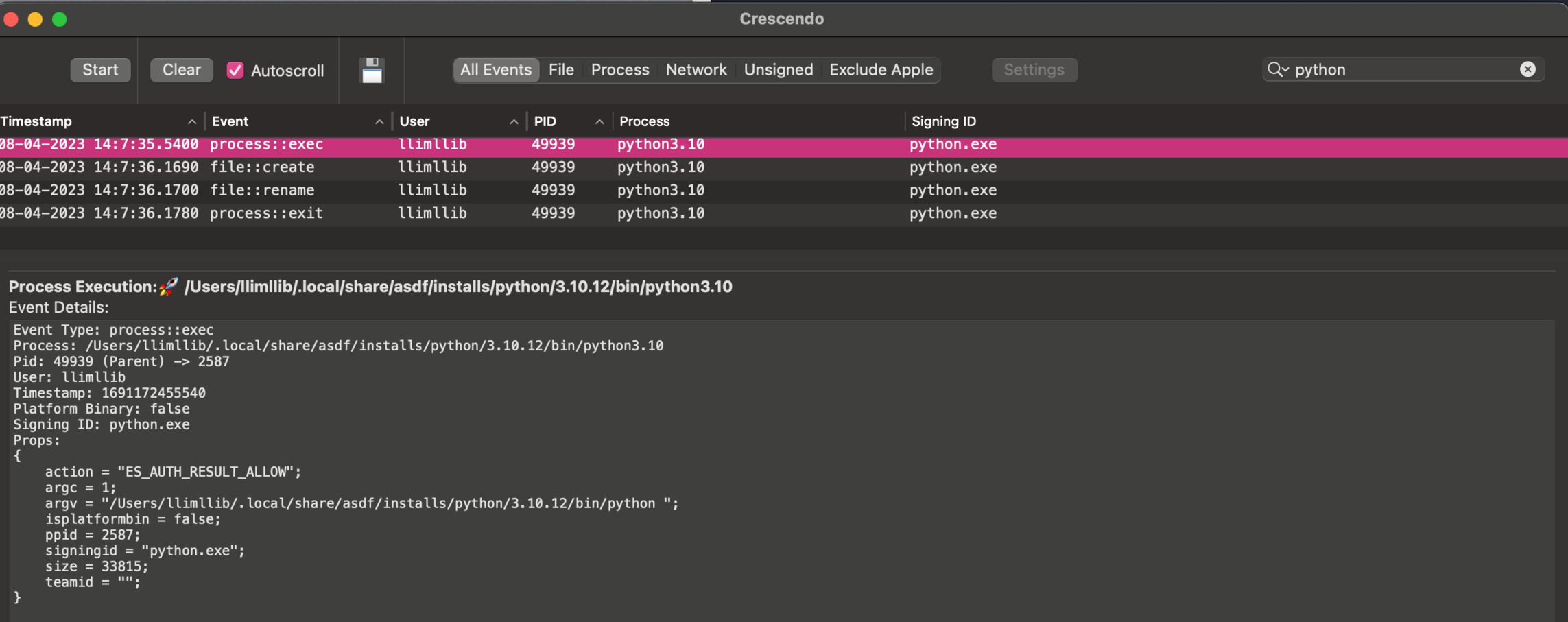
@b0rk The closest I know how to get on a mac without disabling SIP is to install an app that uses a kernel extension to monitor system events. Here's crescendo (https://github.com/SuprHackerSteve/Crescendo) for example:

1 replies
Saagar Jha
(replying to Bill Mill)
1 replies
Saagar Jha
(replying to Saagar Jha)
Bill Mill
(replying to Bill Mill)
@b0rk it will show you file creation and removal, but not stat unfortunately
Bill Mill
(replying to Bill Mill)
@b0rk oh I should have included that it gives you details on the events too, here's the python exec:
Bill Mill
(replying to Bill Mill)
@b0rk If you disable SIP, you can use dtrace or dtruss like strace I think, I'm just not willing to do that to test it out at the moment - if you're interested I can dig into it ab it
1 replies
Julia Evans
(replying to Bill Mill)
@llimllib yea i'm not willing to disable SIP either. whenever I ask about Mac spy tools like this I usually get answers like "oh yeah you can do X but I've never tried it” which makes me very suspicious about the actual utility of the Mac tools in practice :)
Saagar Jha
(replying to Julia Evans)
Bill Mill
(replying to Bill Mill)
@b0rk process monitor and file monitor appear to do the same thing with the same os tools on the command line, but I haven't tried them out: https://objective-see.org/products/utilities.html#FileMonitor